



you can search for slang and colloquial terms using the subwindow display feature and online dictionary integration.
In addition, it features enhanced Kanji Pinyin Conversion Plus and ruby annotation functions,
and is equipped with a wide range of features that are convenient for creating educational materials and content.
 Purchase from the Online Store
- For those who want to create Chinese sentences easily and efficiently
- In addition to Chinese input via Pinyin, the software supports "handwriting input," "Hiragana input," "Katakana input," and "translation anywhere between Japan and China," among other features.
It supports input methods tailored to every level, from beginners to experts. - Those who create teaching materials and learning content
- When creating educational materials, adding Pinyin ruby annotations to kanji is extremely important, but it’s also a very time-consuming task.
Using the “Kanji Pinyin Conversion Plus” feature or the Word/Excel add-ins, you can efficiently add or split Pinyin with tones. - Those who want to learn Chinese
- In addition to six types of digital dictionaries, it integrates with online dictionaries, allowing you to easily search for buzzwords and other terms.
It can also read words and sentences aloud using high-quality text-to-speech, which helps improve listening skills.
"Learning Premium" includes "Certification Exam Prep Lessons" and "Tone Master" for learning Chinese intonation, making it
highly effective for improving overall language proficiency.
-
Convenient and Versatile Features for Japanese Users
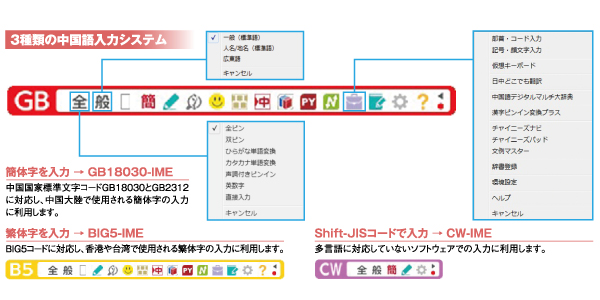 Toolbar (Simplified Chinese)It also supports Simplified and Traditional Chinese, as well as Cantonese.
Even if you don’t know Pinyin, you can easily type and create well-structured sentences. -
Six Types of Digital Dictionaries and Online Dictionary Integration
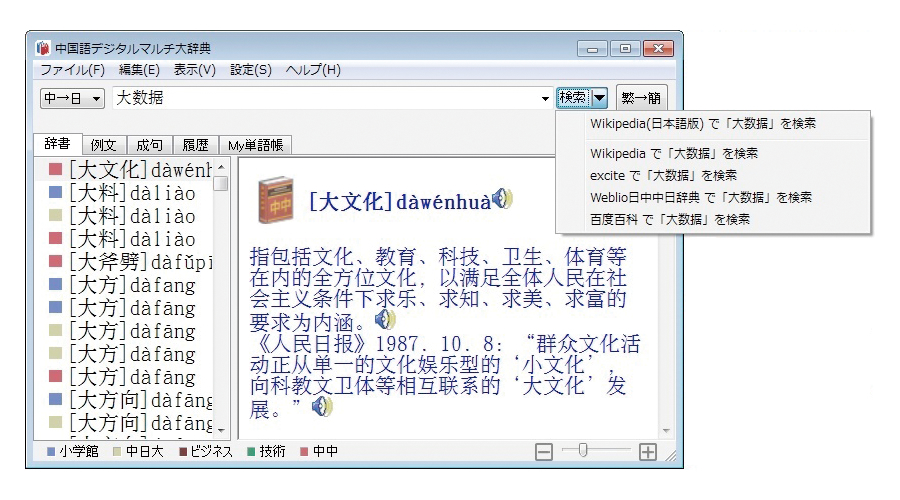 Chinese Digital Multi-DictionaryYou can search using six types of dictionaries, including Chinese-Japanese, Japanese-Chinese, and Chinese-Chinese dictionaries.
You can easily look up new words and buzzwords, register words and example sentences, and have them read aloud using the text-to-speech tool. -
Kanji-to-Pinyin Conversion and Character Conversion
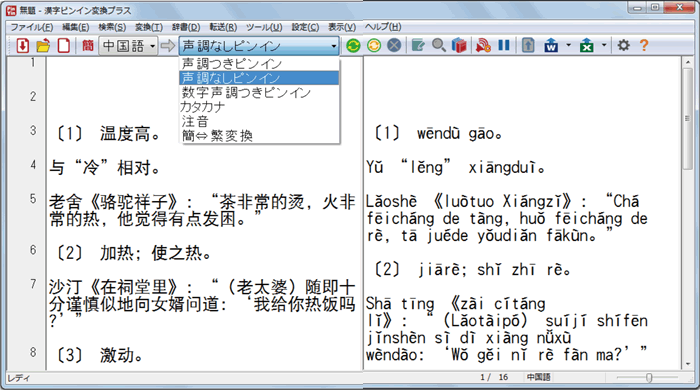 Kanji Pinyin Conversion PlusConvert Chinese to Pinyin and switch between Simplified and Traditional Chinese characters. Additionally, the add-in feature for adding ruby annotations in Word is now available in Excel as well.
 -
"Learning Premium" to Help You Earn Certifications
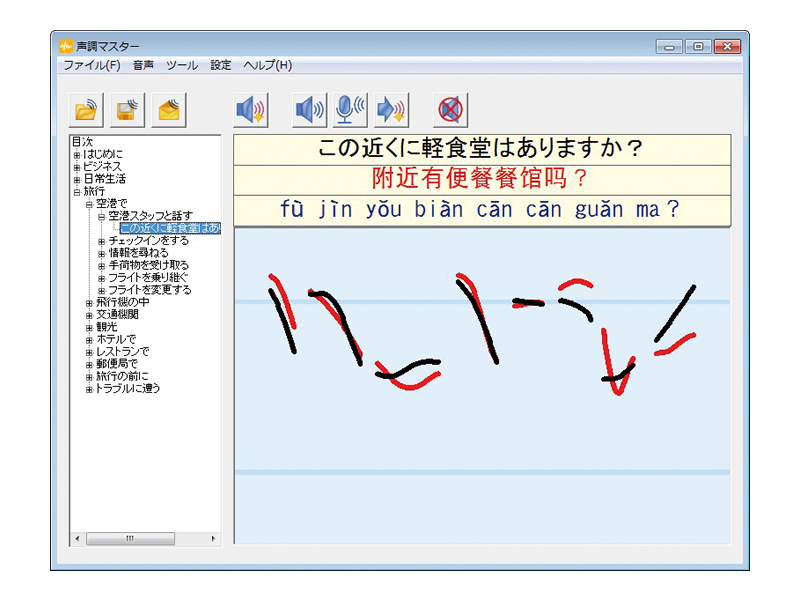 Tone MasterYou can use “Exam Prep Lessons” to prepare for the Chinese Proficiency Test (Pre-Level 4, Level 4, Level 3), as well as “Tone Master,” which allows you to visually check the intonation unique to Chinese and practice speaking.
- I make full use of the Chinese input and dictionary functions. The handwriting recognition rate is high, so it’s very easy to use. (Mr. S, Tokyo)
- The input, dictionary, and other learning support tools are very convenient, and I am very satisfied.
Regarding the dictionary in particular, the extensive audio recordings—which far surpass those of other electronic dictionaries—are extremely helpful for learning. (Mr. S, Shiga Prefecture) - I’m using this to write my doctoral dissertation in Chinese. (Overseas, Mr./Ms. Y)
- It was a great help to receive an immediate response to my inquiry. (Mr. I, Hokkaido)
- I’ve been studying Chinese since retiring, and this has been extremely helpful. (Mr. Y, Okinawa Prefecture)
- There are sometimes Chinese proper nouns—such as names of people and places—that aren’t listed in dictionaries, and I’ve always had trouble both looking them up and typing them in my word processor.
I’m not even at the beginner level yet, but I’d like to start learning the basics. (Mr. Y, Chiba Prefecture) - I’ve been using this software continuously since Version 1—about 20 years now. It’s an indispensable tool for me.
I look forward to seeing the software continue to be enhanced to make it even more user-friendly. (Mr. A, Osaka Prefecture)
A ChineseWriter User Wins First Place at the “34th All-Japan Chinese Speech Contest”!

The NPO Osaka Prefecture Japan-China Friendship Association is an organization that continues to carry out a wide range of activities with the aim of “deepening mutual understanding and friendship between the two countries and contributing to peace and prosperity in Asia and the world.”
Furthermore, our association is an affiliate of the Japan-China Friendship Association (Public Interest Incorporated Association) and is composed of individual, group, and corporate members from the Osaka Prefecture Japan-China Friendship Association (direct members) and the Japan-China Friendship Associations in 15 cities and towns within Osaka Prefecture (referred to as “district associations”).
Feature List
| Function |
Overview |
Standard | Learning Premium | |
|---|---|---|---|---|
| Translate Anywhere, Anytime | Translates up to 128 Japanese characters into Chinese and inserts them at the cursor position | ◯ | ◯ | |
| Kanji Pinyin Conversion Plus | Translates Japanese into Chinese, converts Chinese to Pinyin, and adds ruby annotations using Pinyin | ◯ | ◯ | |
| Chinese Navigator | Import Japanese or Chinese text from within the application to perform kanji conversion, dictionary lookups, and check Chinese pronunciations | ◯ | ◯ | |
| Phrase Master | Includes approximately 5,600 Chinese example sentences. Enter Japanese in the blank spaces to translate into Chinese | ◯ | ◯ | |
| Chinese Pad | An editor capable of converting Chinese character codes and character types | ◯ | ◯ | |
| Chinese Digital Multi-Dictionary | Vocabulary Search | Search across 3 types of Japanese-to-Chinese dictionaries, 4 types of Chinese-to-Japanese dictionaries, and 1 type of Chinese-to-Chinese dictionary | ◯ | ◯ |
| Example Sentence Search | Searches for and displays example sentences containing specific words from two types of dictionaries (Shogakukan/Daishukan). “AND” searches using multiple keywords are also possible | ◯ | ◯ | |
| Idiom Search | Searches for idioms (such as four-character idioms) containing specific words in two types of Chinese-to-Japanese dictionaries (Shogakukan/Daishukan) | ◯ | ◯ | |
| Search History | Displays up to 1,000 search results in the history | ◯ | ◯ | |
| My Vocabulary List | Save up to 2,000 words | ◯ | ◯ | |
| Related Articles & Columns | View special expressions and images included in the Shogakukan Japanese-Chinese Dictionary, 3rd Edition, and the Chinese-Japanese Dictionary, 2nd Edition, directly in your browser | ◯ | ◯ | |
| Online Dictionary Integration | Search on online dictionary websites | ◯ | ◯ | |
| Text-to-Speech | Read Chinese text aloud using text-to-speech | ◯ | ◯ | |
| Add-ins | Compatible with Microsoft Word and Excel 2024/2021/2019/2016 | ◯ | ◯ | |
| User Manual | View detailed operating instructions and support information in PDF format | ◯ | ◯ | |
| Tone Master | A tool that allows you to visually compare the intonation of user speech recorded via a microphone with that of a native speaker | × | ◯ | |
| Certification Prep Lessons | A learning program designed for the Chinese Proficiency Test Levels Pre-4, 4, and 3 | × | ◯ | |
System Requirements/Specifications
| Item | Overview |
|---|---|
| OS |
Windows 11 (64-bit) / Windows 10 (32-bit, 64-bit) Japanese version Not supported by applications running on the Modern UI |
| Compatible PCs | A PC capable of running the above operating systems properly |
| Hard Disk (for full installation) | ChineseWriter11 Standard: Approximately 2.4 GB |
| ChineseWriter11 Learning Premium: Approx. 2.8 GB | |
| Network Environment | After installing the product, license activation via an Internet connection is required |
| Supported Media | ChineseWriter11 Standard: 1 DVD-ROM |
| ChineseWriter11 Learning Premium: 1 DVD-ROM + 1 CD-ROM *A DVD-ROM drive is required for installation | |
| Supported Applications | GB18030 and BIG5 Encoding: Applications supporting multiple languages CW Encoding: Applications—such as word processors, spreadsheets, and graphics software—that allow users to specify and display fonts in input fields |
| Learning Dictionaries | Shogakukan Japanese-Chinese Dictionary, 3rd Edition (approx. 95,000 entries, approx. 150,000 usage examples) |
| Shogakukan Japanese-Chinese Dictionary, 2nd Edition (13,500 root characters, 100,000 entries, 90,000 examples) Native audio (headwords from the Japanese-Chinese Dictionary): approx. 6,800 | |
| Unicode Edition of the Chinese-Japanese Comprehensive Dictionary, 3rd Edition (Number of root character entries: approx. 10,000; total number of entries: approx. 114,000; number of examples: approx. 99,000) | |
| Dictionary of New Chinese Business Terms, Electronic Edition Ver. 3.0 (approx. 17,000 terms) | |
| Nippon Kogyo Publishing Co., Ltd. Japanese-Chinese-English Technical Terminology Handbook (approx. 8,500 terms) | |
| Shanghai Dictionary Publishing House, *Comprehensive Dictionary of Modern Chinese* (Chinese-Chinese Dictionary) (approx. 15,000 root characters, approx. 100,000 compound words, total number of characters: 8.5 million) | |
| Handwriting Recognition Engine | Beijing Jietong Huasheng Speech Technology Co., Ltd. “Chinese Handwriting Input Engine” Supported Code: GB18030 |
| Chinese Text-to-Speech | HOYA Corporation “VoiceText” |
| Audio Playback | Requires either a built-in speaker or a speaker connected to the speaker jack |
| Voice Input | *A microphone jack and microphone are required when entering text via voice using the Tone Master feature in ChineseWriter 11 Learning Premium |
* Not compatible with the Office Store app version.
* GB18030-IME and BIG5-IME support input in multilingual applications.
* Characters outside the GBK range can be entered using the code table.
* GB2312-compatible fonts cannot correctly display all characters with GB18030 codes.
* Fonts with Pinyin support the input and display of characters belonging to the GB2312 standard.
* The translation feature included in the ChineseWriter11 series is based on machine translation and does not guarantee accurate translations at all times.
* The Chinese voice output is synthesized and does not guarantee accurate pronunciation at all times.
* The “Unicode Edition of the Chinese-Japanese Dictionary, 3rd Edition” is a re-edited version of the book “Chinese-Japanese Dictionary, 3rd Edition,” adapted to fit within the scope of Unicode display.
* This product is a single-user license limited to one user.
* Unauthorized copying or misuse of this product is prohibited.
* To receive user support and information on preferential sales for new products, you must register as a user within 30 days of installation.
* To use this product, you must complete online license activation within 14 days of the first launch.
If you do not complete license activation, you will only be able to use the software for 14 days after installation.
| Product Name | Model Number | Boxed Version Price | Download Version Price |
|---|---|---|---|
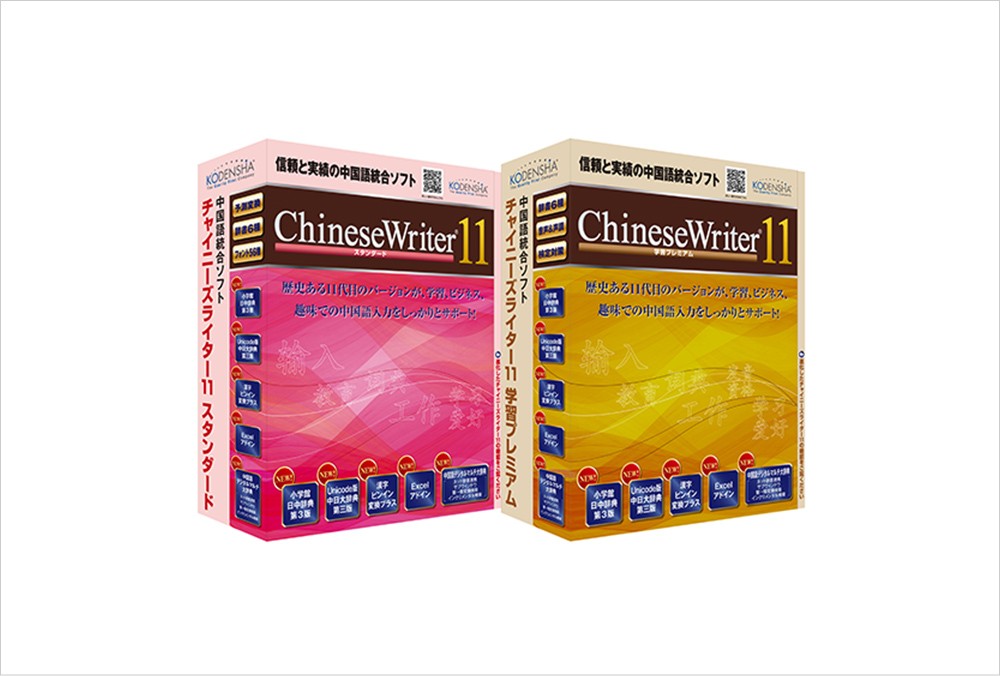
 ChineseWriter11 ChineseWriter11 Standard |
CW11-STDDL | - | 24,200 yen (tax included) Purchase at the online store |
|
ChineseWriter11 Standard Academic |
CW11-SACDL | - | 19,800 yen (tax included) Purchase at the online store |
 ChineseWriter11 ChineseWriter11 Learning Premium |
CW11-PRMDL | - | 27,500 yen (tax included) Buy at the online store |
|
ChineseWriter11 Learning Premium Academic |
CW11-PACDL | - | 25,300 yen (tax included) Buy at the online store |
. We also offer cost-effective license packages.
Educational Institutions
-
The following national, public, and private elementary and secondary educational institutions as defined by the School Education Act
Kindergartens, elementary schools, junior high schools, high schools, secondary schools, and special needs schools
-
The following national, public, and private institutions of higher education as defined by the School Education Act
Universities (including junior colleges, graduate schools, and the Open University), National Colleges of Technology, Specialized Training Schools, and Vocational Schools
-
Various schools with the legal status of a school corporation as defined by the School Education Act
Schools for foreign nationals, etc.
-
Public vocational skills development facilities and vocational training corporations as defined in the Act on the Promotion of Vocational Skills Development
Vocational Training Schools, Vocational Training Junior Colleges, Vocational Training Colleges (including the National Institute for Vocational and Technical Education), Vocational Training Promotion Centers, Vocational Training Schools for Persons with Disabilities, etc.
-
Rehabilitation facilities for persons with physical disabilities established under the Act on Welfare for Persons with Physical Disabilities, as well as the following rehabilitation facilities established under other welfare laws
Rehabilitation facilities for persons with physical disabilities, rehabilitation facilities for the visually impaired, rehabilitation facilities for the hearing- and speech-impaired, and rehabilitation facilities for persons with internal disabilities
-
Colleges and universities established by the national and local governments
Local Government University, National Defense Academy, National Police Academy, Japan Meteorological College, Japan Aviation College, Japan Maritime College, Japan Fisheries College, Japan Agricultural College, etc.
-
Inter-University Research Institutes
High Energy Accelerator Research Organization, National Institute of Polar Research, Institute of Space and Astronautical Science, International Research Center for Japanese Studies, National Institute of Japanese Literature, National Institute of Genetics, Institute of Statistical Mathematics, etc.
-
The following public agencies and public facilities
Boards of Education, Education Centers, Educational Research Institutes, Libraries, Museums, Art Museums, National Institution for Academic Degrees and University Evaluation, National Center for University Entrance Examinations
Individuals
- Pupils, students, and faculty and staff affiliated with the educational institutions listed above.
You will be eligible for special sales offers and technical support.
This service allows users who own older products from Koden-sha to purchase related software at affordable prices.
If using the email form, select “Software Products” from the “Product/Service Category” dropdown, choose the product name, and clearly state “Product Registration Certificate No. and Request for Upgrade” in the “Inquiry Details” field. Then, request your “Special Sales Application No.”
Closed on Saturdays, Sundays, and holidays.
- I’d like to know the upgrade price
- I want to confirm if the “Special Offer Application No.” I received previously is still valid
- Do I need the CD for the previous version? etc.
 Product Catalog